

Scattered chats on personal phones
Today Customer chats arrive on personal phones, leaving managers blind when employees are away.
With MG Tech Chats flow into a shared team inbox where receptionists and managers see every open inquiry.
Manage WhatsApp chats in one inbox, answer in Gulf Arabic, and draft bookings for your team to confirm.
Platform-wide AI
WhatsApp AI inbox
Chats today
42
Bookings drafted
9
AI assistant
Ready
Today Customer chats arrive on personal phones, leaving managers blind when employees are away.
With MG Tech Chats flow into a shared team inbox where receptionists and managers see every open inquiry.
Today Customers asking about prices or slots wait hours for answers, and many book elsewhere.
With MG Tech The AI assistant answers in Gulf Arabic and drafts appointment slots for customers.
Today Staff copy booking details by hand from chats into books, and deposits get misplaced.
With MG Tech Bookings and deposits link to customer records, updating calendars and confirmations.
Today Rigid bot menus give wrong information without supervision, frustrating customers.
With MG Tech The AI assistant uses business data, and all bookings or invoice changes wait for staff.
WhatsApp messages arrive in a shared workspace where receptionists and managers respond together.
Answers inquiries about branches, opening hours and pricing in Gulf Arabic or English.
Customers pick appointment slots and pay deposits on WhatsApp (MG Health and MG Salon).
The assistant checks product stock, service details and pricing directly from your system.
The assistant only drafts replies; staff confirm bookings, orders and invoices before sending.
Send confirmations, visit reminders that cut no-shows and queue alerts on WhatsApp.
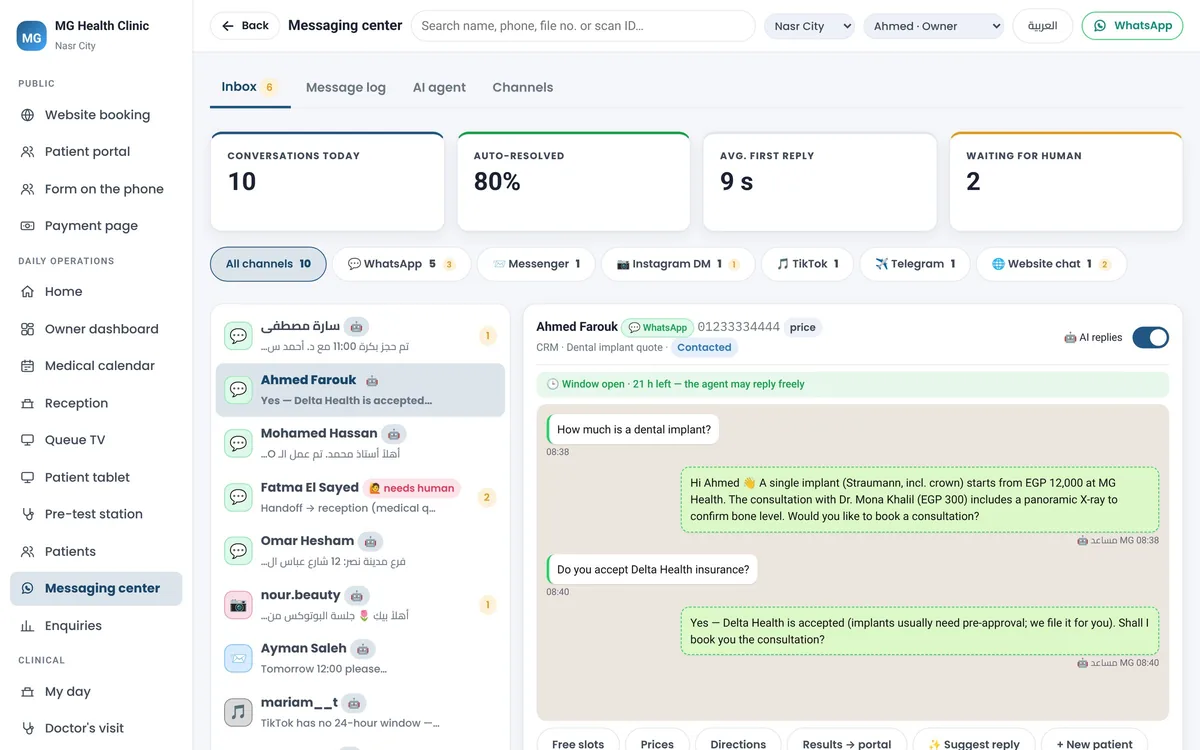
Your business WhatsApp number is connected to MG Tech, so messages arrive in the shared team inbox.
Your services, prices and working hours are already in the system, and the assistant answers from them.
The assistant greets customers in Gulf Arabic or English and prepares booking or inquiry drafts.
Staff approve drafted bookings, collect deposits and take over conversations whenever needed.
Yes. The assistant understands Gulf Arabic and English to answer customer inquiries politely.
No. People stay in control. The assistant only drafts; staff confirm bookings and orders.
Yes. The shared inbox lets receptionists and branch managers view and answer open chats.
The AI inbox is part of the MG Tech platform's AI features: ask us for a quote for your system and package. Published Kuwait prices: Essential KWD 45 per month per system plus a one-time KWD 100 setup, unlimited users.
You own your data. Full export anytime to Excel or CSV, running on regional cloud or your server.
Book a free 45-minute demo prepared around your products, services, appointments or staff.
Every sale, purchase and payment in your accounts with GCC VAT, KNET reconciliation and bilingual reports.
Learn moreFast counter sales with customer balance shown before you sell, split payment and offline checkout.
Learn moreTrack stock and value across branches, scan barcodes on transfers, and manage lot expiry dates.
Learn more