Skip to Content
Approvals from the phone
Approvals from the phone for leave, expenses and requests
Staff submit leave requests, expense claims with receipt photos and custom forms from the phone, while managers approve in one tap with clear notes.
Leave requests with clear balances
Expense claims with a receipt photo
One-tap approvals with manager notes
Custom HR forms built without code
Essential
Approvals from the phone
Sounds familiar?
Why paper forms and chat messages disrupt HR approvals
Lost leave forms in chat messages
Today
Employees send leave requests across personal chats and paper slips that get buried or misplaced during busy work weeks.
With MG People
Staff submit leave in the app, where remaining balances appear upfront and managers review requests in one place.
Crumpled receipts and delayed claims
Today
Field and branch staff keep paper receipts in their pockets for weeks, leading to delayed expense submissions and missing paperwork.
With MG People
Employees take a photo of the receipt immediately, type the amount, and submit the expense claim from their phone.
Verbal approvals missed by payroll
Today
Managers approve leave or expenses by word of mouth, leaving HR unaware until after payroll calculations are completed.
With MG People
Managers approve or refuse requests in one tap on their phone, recording notes and feeding approved dates into payroll.
Unknown leave balances and confusion
Today
Staff ask HR repeatedly about their remaining leave days because balance records sit in separate spreadsheets.
With MG People
Employees check their current leave balance directly on their phone, with approved time off logged on their attendance record.
What you get
Mobile approvals built into daily employee workflows
Leave requests and balances
Staff choose leave types, view remaining balances, and submit vacation or sick days directly from the Time off tab.
Expense claims with receipt photos
Expense claims with a receipt photo, approved in one tap. Employees snap the receipt, add details, and submit.
Forms built without code
Leave, expenses and requests — forms built without code. HR configures fields and approvers for loans or letters.
One-tap manager approvals
Approvers review submissions on their phone, add optional notes, and approve or refuse requests in one tap.
Payroll and attendance connection
Approved leave days feed directly into attendance history and the Kuwait payroll run, deducting unpaid absence.
Tracked status and HR documents
Employees track approval status on their phone, while salary certificates and letters are delivered back into the app.
Real screens
See it exactly as it runs
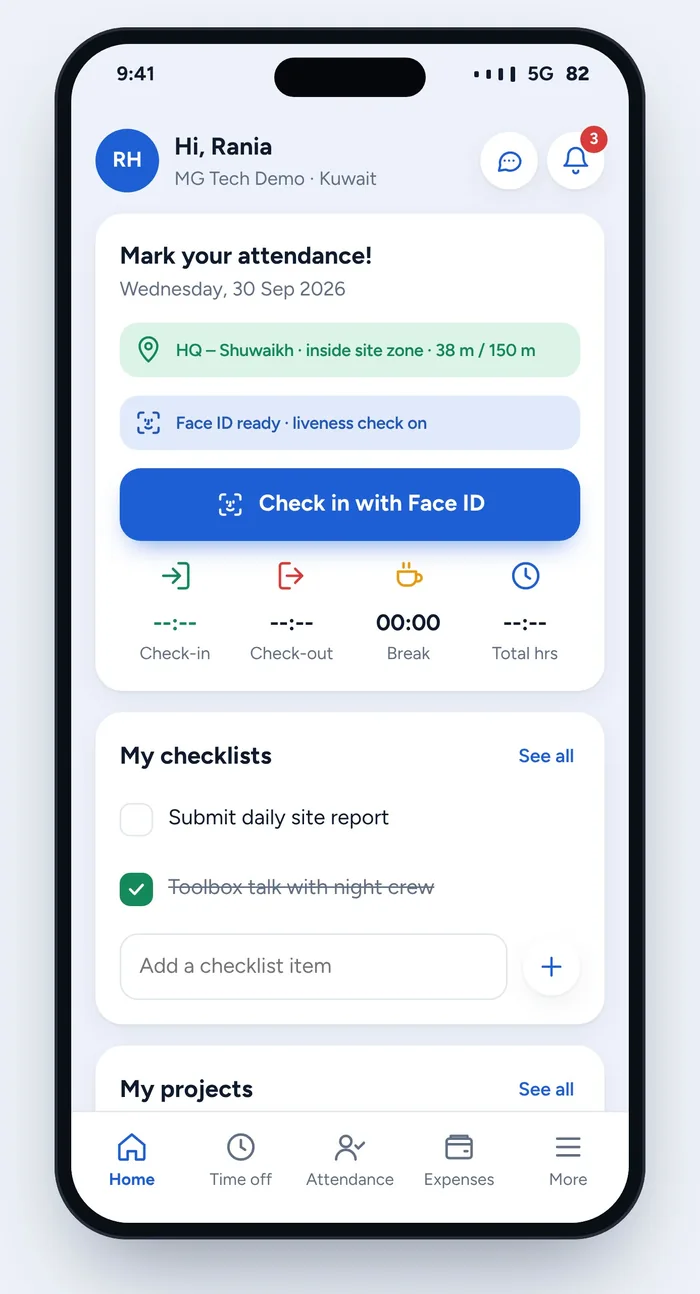 Employee home on the phone
Mobile home screen showing Time off and Expenses tabs, geofenced check-in status, and daily checklists.
Employee home on the phone
Mobile home screen showing Time off and Expenses tabs, geofenced check-in status, and daily checklists.
How it works
How mobile approvals work from request to payroll
-
1
HR configures approval forms
HR sets up leave rules and builds custom request forms without code, specifying the required details and designated approvers.
-
2
Employee submits from the app
The employee opens Time off or Expenses on their phone, checks their balance or attaches a receipt photo, and submits.
-
3
Manager reviews and decides
The request reaches the approver's phone, where the manager reviews details and approves or refuses with an optional note.
-
4
Records and payroll update
The employee sees the updated status in the app, approved leave marks attendance, and payroll deducts unpaid time off.
Available in
Included from the Essential package.
FAQ
Questions we hear most
Can HR build custom request forms without writing code?
Yes. HR can build custom request forms for salary letters, shift swaps, or equipment without code, assigning the fields and approvers directly.
How do approved leave and expense claims connect to payroll?
Approved leave updates employee attendance records and feeds the Kuwait payroll run according to the leave ladder, while unpaid leave is deducted.
Is the mobile app available in Arabic and English?
Yes. The employee app, manager approval screens, notifications and forms are fully available in both Arabic and English with right-to-left support.
How is MG People priced, and are there fees per employee?
There are no per-user fees. In Kuwait, the Essential package is KWD 45 per month per system with a one-time KWD 100 setup and unlimited employees.
Where is our company data stored, and can we export it?
You own your data. You can export everything to Excel or CSV at any time, and choose between hosting on the regional cloud or your own server.
More features
Also worth a look